


Dollarbird Pro
3.3128.00 Reviews
App Specs
- Version
- 6.2.2
- Updated On
- License
- Free
- Downloads
- 50,000+
- Developer
- Dollarbird Apps SRL
- Categories
- Finance
- Platform
- Android
Screenshots
 Analysis by AppCompare
I think the key question with a budgeting app is whether it helps you make a better decision before money leaves your account, not just explain the damage afterward. Dollarbird Pro is built around that forward-looking habit: you record money on a calendar and use the dates to see how planned income and spending fit together. That makes it a different kind of finance app from one focused mainly on account balances or monthly reports. I’d consider it most useful if you want to plan around timing, not simply total up what you spent.
What the free and paid offer means for value
The app is free to download, while in-app purchases range from $7.99 to $79.99 per item. That spread matters: “free” is a clear way to try the calendar-based approach, but it doesn’t tell you which paid option suits your needs or what each one includes. I’d start by using the free access for a real budgeting cycle and only consider a purchase if you can name a specific limitation you’re trying to solve. That is a more reliable test of value than paying because the word “Pro” sounds like a promise of extra capability.
Dollarbird Apps SRL develops the app. It has an average rating of 3.4 from 576 ratings, alongside 123 written reviews, and has passed 50K+ installs. Those figures suggest a real user base, but I wouldn’t treat popularity or an average score as a substitute for checking whether a calendar matches your own habits. Its Everyone content rating makes the age classification broad; it doesn’t mean the app is equally suitable for every kind of financial planning.
Value comes from seeing money on a timeline
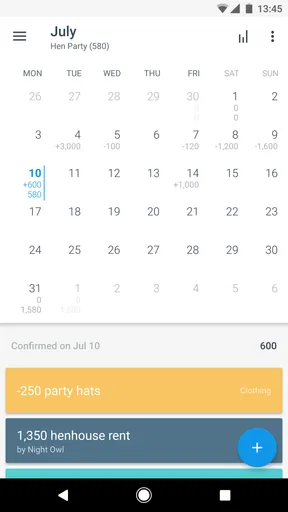
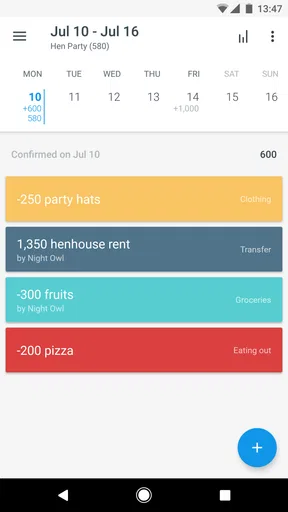
The calendar format can answer a practical question that a category total alone may miss: what will my available money look like after the bills due before payday? For example, if rent, a subscription and a planned grocery shop fall in the same stretch, placing them on their actual dates can make a tight week visible early. That view is especially useful when your income arrives on a predictable schedule but your expenses are scattered across the month.
There is a trade-off, though. A forecast is only as useful as the entries behind it. If I forget a cash purchase, record a bill on the wrong date or leave an old recurring item in place, the calendar can give me a misleading sense of what is coming. I’d treat its projections as a planning aid that needs regular upkeep, not as a guaranteed picture of my bank balance or a replacement for checking the account itself.
Where it fits among finance apps
Compared with a spreadsheet, the app gives you a dedicated calendar interface and a more guided way to enter dated transactions, while a spreadsheet can be reshaped around unusual rules or custom calculations. Compared with a basic expense tracker that emphasizes past spending, Dollarbird’s main appeal is planning future cash flow. And if your priority is automatic transaction imports and a live consolidated bank view, I’d look for a service that clearly centers those functions rather than choosing this one on the assumption that every finance app does them.
That distinction also helps answer whether it can replace a bank app. I wouldn’t use a budgeting calendar as my source of truth for whether a card payment has cleared. I’d use it to organize expected money movements, then verify actual balances and transactions with my financial institution. Keeping those jobs separate reduces the risk of treating an estimate as available cash.
Worth Reading Before You Choose

EA SPORTS FC Mobile 26 Is a Bigger Football Game, but It Takes Time

Flipboard Shows What News Apps Must Do Beyond the Feed

Switching to Android Auto Means Rethinking Your Driving Routine

Google Calendar Makes a Crowded Week Easier to Manage

Ludo King Makes the Most of the Minutes Between Plans

Baby Panda World Brings Quick Play to Modern Phones, but Its Game Library Feels Busy
First Impressions: What is Dollarbird Pro?
Have you ever found yourself at the end of the month wondering where all your money went? Trust me, I've been there. That's when I stumbled upon Dollarbird Pro, an app that's like a financial buddy right in your pocket. Let me take you through my experience with this nifty little app.
So, Dollarbird Pro is essentially a smart calendar-based budgeting tool. The moment you open the app, you're greeted with a clean and simple interface that's refreshingly easy to navigate. It feels like the designers knew exactly how chaotic our financial lives can be and decided to make it as straightforward as possible.
Getting Started: Setting Up Your Finances
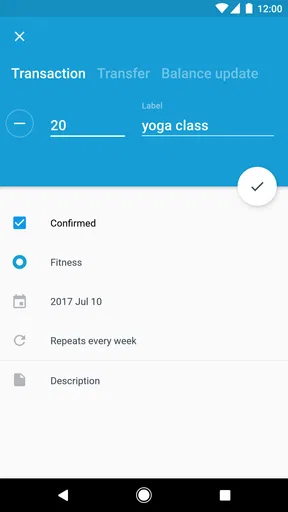
Setting things up was a breeze. You start by adding your incomes and expenses to the calendar. Each entry goes straight into the date you choose, so you can visually track where your money is going. I loved how the app allows you to categorize expenses, making it super easy to identify where I might be overspending. Plus, with the ability to add recurring transactions, I could set it and forget it for my monthly subscriptions.
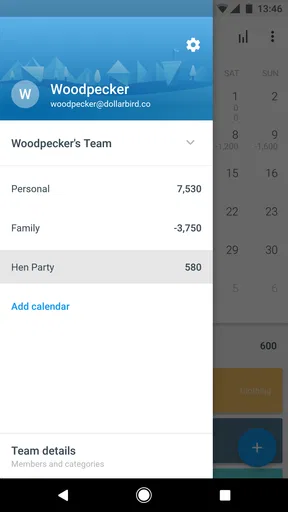
And here's a pro tip: You can invite your partner or family members to collaborate on the same calendar. No more excuses for not knowing who spent what!
Analyzing Your Spending: Insightful Features
Now, what really sets Dollarbird Pro apart is its ability to project your future financial situation based on your current habits. The AI in the app learns from your spending patterns and offers suggestions. It's like having a financial advisor whispering in your ear, "Hey, maybe cut back on the daily lattes."
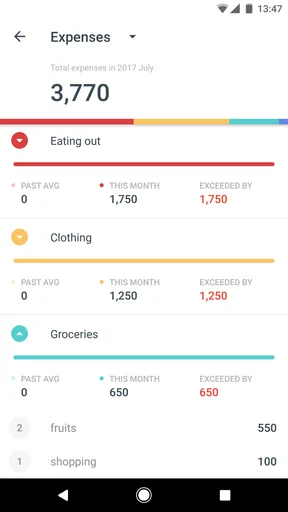
The app also offers insightful charts and graphs. I'm a visual learner, so seeing my financial trends laid out in a colorful pie chart was both enlightening and slightly alarming. But hey, knowledge is power, right?
For the forecast to be useful, I’d enter known income and fixed bills first, then add flexible spending as I go. This creates a workable outline without demanding that I predict every small purchase in advance. I’d also review recurring transactions when a subscription changes or ends; a calendar is good at carrying forward a pattern, but that convenience can turn into stale information if I never revisit it.
A useful habit is to check the upcoming days before committing to a nonessential purchase, rather than looking only at a monthly spending chart afterward. If the calendar shows several known expenses arriving before the next income entry, I can delay the purchase or make a smaller one. That simple check is a more concrete use of a forecast than expecting an AI suggestion to make the decision for me.
Practical Use: Everyday Budgeting Made Easy
One of the things I appreciate most about Dollarbird Pro is its practicality. I found myself using it almost daily, whether to enter a quick expense or to check my financial status before making a big purchase. It’s become a habit, one that’s surprisingly easy to maintain thanks to the app’s user-friendly design.
The notifications are handy without being intrusive, gently reminding me to update my expenses. And because it’s available on both Android and iOS, I can sync my data across all my devices. Handy for a tech junkie like me who switches between gadgets constantly!
Here’s a realistic week-to-week use: I add my expected pay and regular bills at the start of the month, then record variable costs after errands or meals out. Before a weekend away, I look at the calendar to see which bills are due soon and whether I’ve already set aside money for them. That doesn’t make the trip free, of course; it gives me a clearer basis for deciding what I can comfortably spend.
For shared planning, I’d agree with everyone involved on what belongs in the calendar and who will enter it. A shared view is most helpful when household members use the same conventions for dates and categories. If one person records every small purchase and another logs only bills, the picture can become uneven, so a quick weekly check-in is more useful than assuming collaboration alone keeps the records accurate.
Dollarbird is less suited to someone who dislikes manual entry or wants a financial dashboard populated automatically. In that case, the discipline of recording transactions may feel like extra work, and a bank-focused tracker could be a better fit. Likewise, people who need intricate custom budgeting rules may prefer a spreadsheet they can shape themselves. The calendar is strongest when dates and cash-flow timing are the central questions.
Overall Experience: A Keeper in My App Arsenal
After spending a few weeks with Dollarbird Pro, I can honestly say it's a keeper. It’s helped me become more mindful of my spending and, dare I say, a bit more frugal. The ease of tracking finances through a calendar format just clicks with me. It feels intuitive and natural, something I didn’t expect from a budgeting app.
Of course, there are a few things I’d love to see improved, like more customizable categories or perhaps even integration with banking apps for automatic data entry. But those are minor quibbles compared to the overall benefits.
One thing I’d keep in mind is that a clear chart can look more precise than the records deserve. I’d correct an entry as soon as I notice an error, rather than waiting for the end of the month and trying to reconstruct several weeks from memory. For an irregular expense, I’d mark a realistic expected date and revisit it if the timing changes. Those small checks make the calendar more dependable without turning budgeting into a second job.
The app’s current version is 6.0.9, and it runs on Android devices with version 5.0 or later. If you’re choosing between platforms, the practical question is whether the devices you actually use can run it and whether a calendar-based workflow suits you; I wouldn’t switch phones just for a budgeting tool. Since it is also available on iOS, the cross-device appeal may matter to households that do not all use the same type of phone.
Dollarbird Pro is a finance app for someone who wants to see the month unfold by date and is willing to keep that view current. I’d try the free access before spending, then judge the paid value against a concrete need rather than assuming every purchase is necessary. If you want automated bank tracking, highly tailored calculations or a hands-off record, I’d skip it in favor of a tool designed around those priorities. If you want a readable plan for what is due before your next income arrives, I think its calendar approach is worth trying.
In a world where financial planning can feel overwhelmingly complex, Dollarbird Pro simplifies the process in a way that’s approachable and effective. If you’re looking for a friendly yet powerful tool to manage your money, give Dollarbird Pro a shot. It might just be the financial game-changer you’ve been searching for.
Pros
- User-friendly interface for easy navigation.
- Collaborative feature for shared budgeting.
- Customizable categories for expenses.
- Automatic transaction import saves time.
- Detailed reports for financial insights.
Cons
- Limited free version features.
- No direct bank integration.
- Occasional sync issues reported.
- Subscription can be pricey for some.
- Requires manual data entry for accuracy.
FAQs for Dollarbird Pro
What is Dollarbird Pro and how does it differ from the free version?
Dollarbird Pro is an advanced version of the popular personal finance app, Dollarbird. It offers additional features such as collaborative budgeting, multiple calendar views, and enhanced reporting tools. Unlike the free version, Dollarbird Pro allows users to share their financial data with family members or partners, making it ideal for joint budgeting.
Is my personal financial data secure with Dollarbird Pro?
Yes, Dollarbird Pro places a strong emphasis on data security. The app uses encryption to protect your financial information and adheres to stringent privacy policies. Data is stored securely on cloud servers, ensuring that your personal and financial details remain confidential and safe from unauthorized access.
Can Dollarbird Pro be used for business budgeting?
While Dollarbird Pro is primarily designed for personal finance management, it can be adapted for small business budgeting. The app’s collaborative features and multiple calendar options allow users to track business expenses and income alongside personal finances, making it a versatile tool for entrepreneurs and freelancers.
Does Dollarbird Pro offer support for multiple currencies?
Yes, Dollarbird Pro supports multiple currencies, making it suitable for users who deal with international finances. You can set a default currency for your transactions, but also log entries in different currencies, which is particularly useful for travelers or those with overseas investments.
How user-friendly is Dollarbird Pro for beginners in budgeting?
Dollarbird Pro is designed with user-friendliness in mind, featuring an intuitive interface that beginners will find easy to navigate. The app provides helpful tutorials and guides to assist new users in setting up their budgets and understanding financial trends, ensuring a smooth experience for those new to budgeting.


